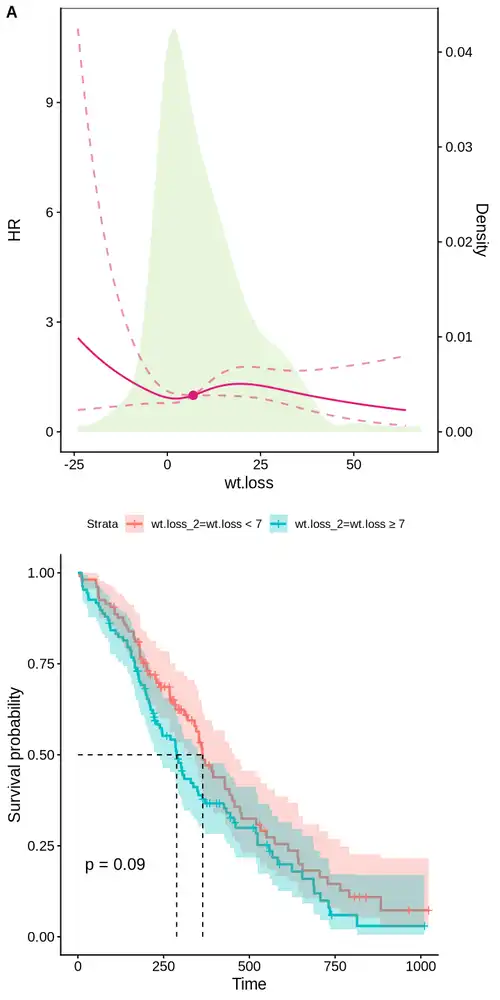
【绘图】使用RCS展示剂量反应关系

Last updated on January 18, 2026 pm

数据拟合过程中,由于两端的数据较稀疏,如果在两端用立方样条,容易出现置信区间偏大的情况,因此,我们通常会把两端设定成线性回归,中间仍然设定成立方样条,这种方法称为限制性立方样条模型(Restricted Cubic Spline, RCS)。

RCS常用来探索连续变量(比如LGE的具体百分比、ECV的具体数值)与结局风险(Hazard Ratio, HR)之间的非线性关系。

早期的研究往往只做简单的线性回归(假设数值越大风险越高),或者人为地按四分位数分组。但生物学指标往往不是线性的(比如血糖、血压,过高过低都不好,或者超过某个值才危险)。RCS是目前公认的展示“剂量-反应关系”的最佳工具,它比单纯的线性回归更严谨,能捕捉到数据的细微变化趋势。

RCS能告诉我们,随着连续变量数值的增加,死亡风险并不是匀速增加的,而是可能在某个点突然变得很陡峭(风险激增)。

配置环境

1
2
mamba create -n r_rcs conda-forge::r-tidyverse conda-forge::r-irkernel conda-forge::r-survival conda-forge::r-survminer conda-forge::r-rms conda-forge::r-cowplot conda-forge::r-proc conda-forge::r-timeroc -y
conda run -n r_rcs Rscript -e "IRkernel::installspec(name='r-rcs', displayname='r-rcs')"

配置环境

1
2
3
4
5
6
7
require(survival) # 生存分析包
require(survminer) # 生存分析作图包
require(rms) # 限制性立方样条分析包
require(tidyverse)
require(cowplot)
options(repr.plot.width=6, repr.plot.height=12)
RColorBrewer::display.brewer.all(type = "all")

示例数据

1
2
3
4
5
df <- survival::lung
# normally 0=alive, 1=dead. Other choices are TRUE/FALSE (TRUE = death), 1/2 (2=death)
dt_surv <- df %>% with(survival::Surv(time, status))
dd_df <- datadist(df) # 查看数据分布
dd_df

简单建模

1
2
3
4
5
6
7
8
9
10
11
12
13
14
15
# 通过AIC找到最优节点数
aic_vector <- c()
aic_formula <- c()
for(knot in seq(3,10)){
f_dt = formula(sprintf("dt_surv ~ rms::rcs(%s, %d) + sex", 'wt.loss', knot))
coxph_dt <- rms::cph(
f_dt,
data = df
)
aic_dt <- extractAIC(coxph_dt)
aic_vector <- c(aic_vector, aic_dt[2])
aic_formula <- c(aic_formula, f_dt)
}
aic_im = which.min(aic_vector)
print(paste0("最优模型 ", aic_formula[aic_im],", AIC ", round(aic_vector[aic_im],3)))
1
2
3
4
5
# 使用最优节点数构建模型
coxph_dt <- cph(
aic_formula[[aic_im]],
data = df
)

预测风险比

1
2
3
4
5
6
7
8
# 全人群,在特定范围内预测风险比
options(datadist="dd_df")
hr_full <- rms::Predict(
coxph_dt,
wt.loss = seq(from=-24, to=64, length.out=200),
fun = exp,
ref.zero = TRUE
)
1
2
3
4
5
6
7
8
9
# 分性别,在特定范围内预测风险比
options(datadist="dd_df")
hr_sex <- rms::Predict(
coxph_dt,
wt.loss = seq(from=-24, to=64, length.out=200),
sex=c("0","1"),
fun = exp,
ref.zero = TRUE
)

可视化风险分布

1
2
3
4
5
6
7
8
9
10
# 全人群
g1 <- hr_full %>% as.data.frame %>% ggplot(aes(x = `wt.loss`, y = yhat)) +
cowplot::theme_cowplot() +
geom_line(linetype="solid", color="#dd1c77", size=0.8) +
geom_line(aes(y = upper), linetype="dashed", color="#dd1c77", size=0.8, alpha=0.5) +
geom_line(aes(y = lower), linetype="dashed", color="#dd1c77", size=0.8, alpha=0.5) +
geom_hline(yintercept=1, linetype="dashed", size=0.7) +
labs(x="wt.loss", y="HR") +
theme(legend.position = c(0.8,0.9))
g1
1
2
3
4
5
6
7
8
9
10
11
12
13
# 分性别
g2 <- hr_sex %>% as.data.frame %>% ggplot(aes(x = `wt.loss`, y = yhat, color=sex)) +
cowplot::theme_cowplot() +
geom_line(linetype="solid", size=0.8) +
geom_line(aes(y = upper), linetype="dashed", size=0.8, alpha=0.5) +
geom_line(aes(y = lower), linetype="dashed", size=0.8, alpha=0.5) +
scale_color_manual(values=c("#08519c", "#dd1c77")) +
geom_ribbon(aes(ymin=lower, ymax=upper, fill=sex), alpha=0.5, color=NA) +
scale_fill_manual(values=c("#c6dbef", "#d4b9da")) +
geom_hline(yintercept=1, linetype="dashed", size=0.7) +
labs(x="wt.loss", y="HR") +
theme(legend.position = c(0.8,0.9))
g2

叠加密度图

1
2
3
4
5
6
7
8
9
10
hr_df <- hr_full %>% as.data.frame

# 定义缩放系数:
max_hr_y <- max(hr_df$upper, na.rm = TRUE)
max_density <- max(density(df$wt.loss, na.rm = TRUE)$y)
coeff <- (max_hr_y / max_density) * 1

# 获取阈值点:
min_hr <- which.min(hr_df$upper - hr_df$lower)
print(paste0("阈值点为 ", round(hr_df$wt.loss[min_hr], 1), ', HR为 ', round(hr_df$yhat[min_hr], 1)))
1
2
3
4
5
6
7
8
9
10
11
12
13
14
15
16
17
18
19
20
21
22
23
hr_df <- hr_full %>% as.data.frame
g3 <- ggplot() + cowplot::theme_cowplot() +
geom_density(data = df,
aes(x = wt.loss, y = after_stat(density) * coeff),
fill = RColorBrewer::brewer.pal(8, 'Paired')[3], color = NA, alpha = 0.3, inherit.aes = FALSE) +
geom_line(data = hr_df,
aes(x = wt.loss, y = yhat),
linetype="solid", color="#dd1c77", linewidth =0.8) +
geom_line(data = hr_df,
aes(x = wt.loss, y = upper),
linetype="dashed", color="#dd1c77", linewidth =0.8, alpha=0.5) +
geom_line(data = hr_df,
aes(x = wt.loss, y = lower),
linetype="dashed", color="#dd1c77", linewidth =0.8, alpha=0.5) +
geom_point(data = hr_df[min_hr,],
aes(x = wt.loss, y = yhat),
color = "#dd1c77", size = 3) +
scale_y_continuous(
name = "HR",
sec.axis = sec_axis(~ . / coeff, name = "Density")
) +
labs(x = "wt.loss") + theme(legend.position = c(0.8, 0.9), panel.border = element_rect(colour = "black", fill = NA, size = 0.5))
g3

绘制生存曲线

1
2
3
4
5
6
7
8
9
10
11
12
13
14
min_hr_v = round(hr_df$wt.loss[min_hr], 1)
v_labels = c("wt.loss < ", "wt.loss ≥ ")
v_labels = paste(v_labels, min_hr_v,sep = '')
df$wt.loss_2 <- factor(
df$wt.loss < hr_df$wt.loss[min_hr],
levels = c(TRUE, FALSE),
labels = v_labels
)
fit <- survfit(dt_surv ~ wt.loss_2, data = df)
g4 <- ggsurvplot(fit, data = df,
surv.median.line = "hv", # 增加中位生存时间
pval = TRUE, # 添加P值
conf.int = TRUE) # 增加置信区间
g4$plot

组合图片

1
2
options(repr.plot.width=6, repr.plot.height=12)
plot_grid(g3, g4$plot, labels = c("A", ""), nrow = 2, align = "v")


【绘图】使用RCS展示剂量反应关系
https://hexo.limour.top/using-rcs-to-demonstrate-dose-response-relationship
Author
Limour
Posted on
January 18, 2026
Updated on
January 18, 2026
Licensed under